

Best OpenAI FM Alternatives in 2026: Top AI Models You Should Try
OpenAI.fm is an awesome demo if you just want to “hear what’s possible,” but when you actually need a serious text‑to‑speech (TTS) setup for content, apps, or clients, there are much better options out there. This guide walks you through the best OpenAI.fm alternatives, when they make sense, and how to choose the right one without burning time or money.
What is OpenAI.fm, really?
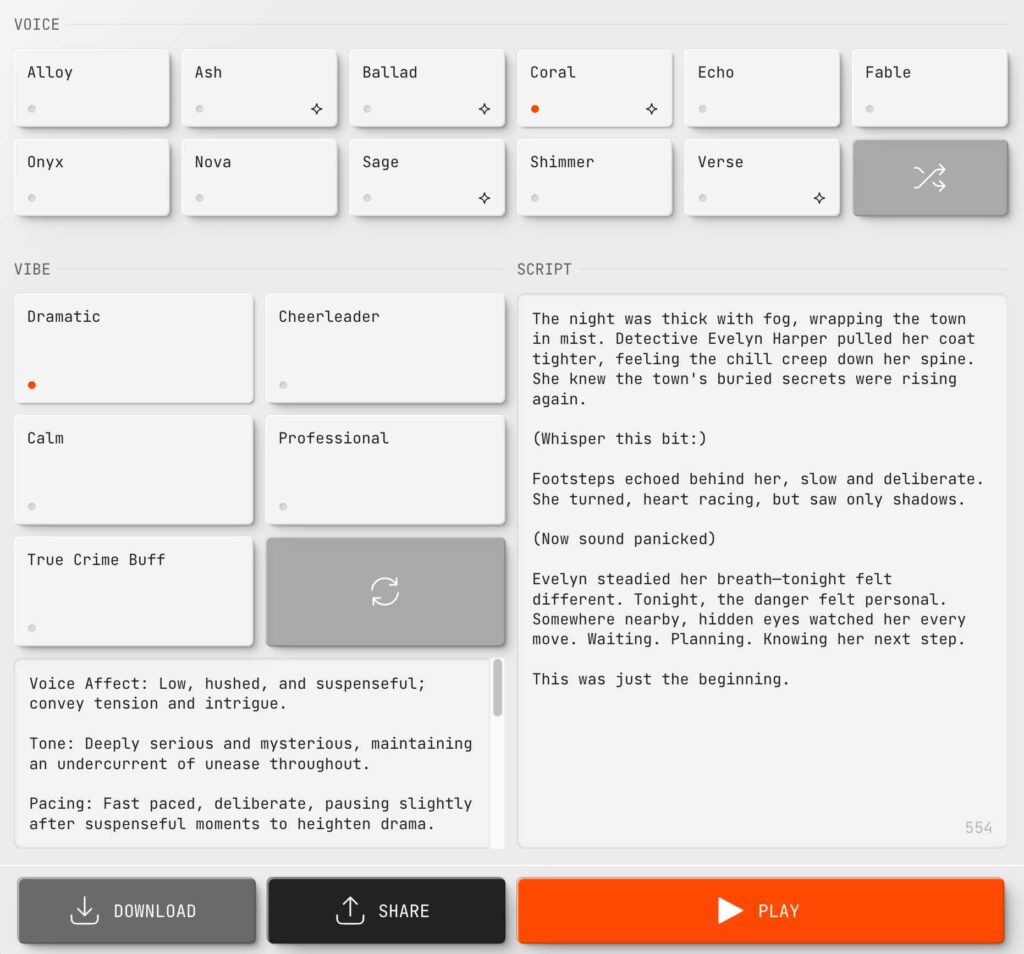
OpenAI.fm is not a full SaaS product; it’s an interactive showcase for OpenAI’s latest speech models like gpt‑4o‑mini‑tts. You type text, pick a voice and vibe, and it spits out audio so you can “hear before you build” with the actual Speech API.
In simple terms:
-
It’s a demo front‑end, not a full TTS platform with projects, teams, or asset management.
-
It exists so devs can test voices, styles, and latency before wiring it into their own apps.
-
For production, you’re still supposed to use the OpenAI Audio / TTS API directly.
So if you were thinking, “I’ll just use OpenAI.fm as my main TTS tool,” that’s like trying to run a YouTube channel from the YouTube test page.
Why look for OpenAI.fm alternatives?
Honestly, the moment you try to do anything beyond “play with voices,” the cracks start to show.
Limitations that hurt in real use
-
No real project organization, file library, or collaboration features.
-
No built‑in licensing clarity for commercial reuse like some dedicated TTS platforms provide.
-
You’re ultimately still tied to OpenAI API pricing and ecosystem.
By the way, if you’re a content creator, YouTuber, podcaster, or app builder, you probably want:
-
Easy bulk conversion (scripts → multiple voiceovers).
-
Cheaper / predictable per‑character pricing.
-
Simple download, export, and versioning workflows.


That’s where proper OpenAI.fm alternatives shine.
Types of OpenAI.fm alternatives
Instead of lumping everything together, it helps to see the categories.
1. Full‑stack TTS platforms
These are “login, paste script, export MP3/WAV, done” tools with dashboards, teams, and often commercial‑use licenses.
Examples include:
-
NaturalReader
-
Speechify
-
Murf AI
-
Voicemaker
-
TTSMaker
-
SpeechGen.io
They’re great if:
-
You don’t want to touch code.
-
You need workflow features (projects, history, sharing).
-
You care about copyright / licensing clarity.

2. API‑first audio services
These are closer in spirit to the OpenAI Speech API, but often cheaper or more specialized.
-
MiniMax Audio and similar platforms focus on multi‑language, high‑quality synthetic voices.
-
Some support up to 200k‑character long‑form input, URL reading, and advanced voice cloning.
Ideal if:
-
You’re building a SaaS, chatbot, voice app, or IVR.
-
Latency and streaming matter more than UI.
3. Free / lightweight web tools
You’ll also find free or freemium tools like TTSMaker, ttsMP3.com, or small web apps that just let you paste text and download speech.
They work when:
-
You just need occasional voiceovers.
-
Budget is zero, and you’re okay with limits or attribution.

Top OpenAI.fm alternatives (with use cases)
Let’s dive in. Here’s a quick snapshot of some of the most useful alternatives people actually use in 2025.
Major OpenAI.fm alternatives overview
| Tool | Best for | Key strengths |
|---|---|---|
| NaturalReader | Everyday creators & educators | Simple UI, multi‑language, varied voices. |
| Speechify | Content consumers & creators | Reading articles/books, solid mobile apps. |
| Murf AI | Professional voiceovers & teams | Studio features, workspaces, team collab. |
| Voicemaker | Flexible online TTS | Many voices, adjustable parameters. |
| TTSMaker | Free quick TTS | Free plan, online usage, many languages. |
| SpeechGen.io | Long‑form & bulk conversions | Batch TTS, many languages/voices. |
| MiniMax Audio | API‑driven audio apps | Long text, multiple languages, voice cloning. |
NaturalReader
NaturalReader is a long‑standing TTS solution with web, mobile, and even desktop tools. It supports multiple languages and AI voices and targets personal, commercial, and educational use.
If you’re converting blog posts, PDFs, or scripts regularly, it feels more like a polished “reading companion” than a demo.
Speechify
Speechify started as a “read anything for me” app for students and busy folks, then expanded into content creation. You import web pages, docs, or text and listen on mobile, browser, or desktop.

If your main need is listening to content plus sometimes generating voiceovers, it beats OpenAI.fm hands down for UX.
Murf AI
Murf AI positions itself as a studio‑grade voiceover platform for videos, podcasts, ads, and training content. It offers workspaces, timelines, background music, and commercial‑use voices.
Think of it as “Canva, but for voiceovers and narration,” not just a bare TTS box.
Voicemaker, TTSMaker, SpeechGen.io
These are more lightweight but surprisingly powerful:
-
Voicemaker offers many neural voices with sliders for pitch, speed, and emphasis.
-
TTSMaker emphasizes free online text‑to‑speech with multiple languages.
-
SpeechGen.io supports long‑form text, many languages, and bulk conversions.
Perfect when you need utility more than fancy branding.
MiniMax Audio & similar APIs
Platforms like MiniMax Audio focus on developers needing high‑quality speech across languages, with support for long text (up to about 200k characters), URL reading, voice cloning, and more.
These are closer to “OpenAI Speech API competitors” than to OpenAI.fm directly—but they’re exactly what you want if you’re building SaaS features or bots.
OpenAI.fm vs dedicated TTS tools
To really see where OpenAI.fm stands, here’s a quick comparison versus a typical full TTS platform (e.g., NaturalReader/Murf‑style).
| Feature | OpenAI.fm demo | Full TTS platforms (e.g., NaturalReader/Murf) |
|---|---|---|
| Primary purpose | Showcase OpenAI Speech models. | Create usable voiceovers & audio assets. |
| Access | Browser demo linked to OpenAI. | Web app dashboard, sometimes desktop/mobile. |
| Project/workspace management | Minimal or none. | Projects, folders, timelines, history. |
| Licensing clarity | Depends on OpenAI API terms. | Clear commercial plans and usage rights. |
| Voice/styling controls | Tone, emotion, speaking style via API showcase. | Per‑voice settings, SSML controls, presets. |
| Target users | Developers testing models. | Creators, marketers, educators, devs. |
| Integration | Via OpenAI TTS / audio API. | Some offer APIs; others are no‑code only. |
When to stick with OpenAI’s own ecosystem
To be fair, sometimes the best OpenAI.fm “alternative” is actually just using OpenAI’s audio models directly instead of the demo.
OpenAI’s newer audio stack includes:

-
Text‑to‑speech with multiple built‑in voices, configurable via the Speech API.
-
Models aimed at controllable TTS like gpt‑4o‑mini‑tts with fine‑grained control over tone and speed.
-
Real‑time streaming audio with low latency for voice agents and interactive apps.
For builders who are already using OpenAI for chat or vision, staying in the same ecosystem simplifies billing and integration.
How to choose the right OpenAI.fm alternative
Choosing a TTS tool is like choosing a microphone: they all “work,” but only one really fits your use case.
Step 1: Decide your primary use case
-
YouTube videos, explainers, reels
-
Podcasts or audio articles
-
App or website voice features
-
Assistive reading / accessibility
Different tools are weighted differently for each of these.
Step 2: Check voice quality & language support
Most modern tools have “good enough” voices, but some stand out:
-
Platforms like Murf and Speechify focus heavily on natural‑sounding English voices.
-
Tools such as NaturalReader, SpeechGen.io, and TTSMaker highlight broad language coverage.
Always audition voices with your actual script style before committing.

Step 3: Look at pricing structure
OpenAI’s own audio pricing is token‑based, while many TTS platforms use character‑based tiers or monthly quotas.
-
If you produce large, predictable volumes, flat monthly tiers can be cheaper.
-
If usage is spiky or experimental, pay‑as‑you‑go APIs might make more sense.
Step 4: Workflow & features
Ask yourself:
-
Do you need timelines, background music, and multi‑track editing? (Go for studio‑like platforms such as Murf.)
-
Do you only need quick script → MP3 generation? (Voicemaker, TTSMaker, or SpeechGen.io work well.)
-
Are you building a product where users trigger TTS? (OpenAI’s API or MiniMax‑style APIs are a better fit.)

FAQs about OpenAI.fm alternatives
1. Is OpenAI.fm free?
OpenAI.fm itself is presented as a demo interface to test voices, but production usage relies on OpenAI’s paid Audio / TTS API pricing. Depending on your usage, you pay via token‑based pricing for audio models on the OpenAI platform.
2. Can OpenAI.fm be used for commercial projects?
OpenAI.fm is meant for experimentation; actual commercial usage depends on the OpenAI API terms and pricing for audio models. If you want explicit commercial‑use licensing and invoices tailored for content creation, many dedicated TTS platforms (like Murf or others listed above) spell this out more clearly.
3. What’s the best OpenAI.fm alternative for YouTube voiceovers?
Professional voiceover platforms with studio‑style features (such as Murf AI or similar tools) tend to be popular because they provide voice libraries, timelines, and export options geared toward video production. Other platforms like NaturalReader and SpeechGen.io can also handle long‑form scripts well for YouTube narration.
4. Which OpenAI.fm alternative is best for developers?
If you’re a developer building voice‑enabled apps or agents, using the OpenAI Audio / TTS API directly—or similar audio APIs like MiniMax Audio—gives you programmatic control, streaming support, and scalable pricing. OpenAI’s voice agent guides also show how to wire these models into real‑time voice agents.
5. Are there any completely free OpenAI.fm alternatives?
Some tools like TTSMaker and certain basic web TTS services offer free tiers that let you convert text to speech online with multiple voices and languages, though they often include limits or require attribution. For ongoing commercial work, paid plans are usually necessary to unlock higher limits and clearer rights.
Final thoughts + Call to action
At the end of the day, OpenAI.fm is like a flashy test drive—great to feel the engine, not great to run a business on. Once you know your use case (content, dev, or accessibility), picking a proper OpenAI.fm alternative becomes way easier using the categories and examples above.
If you’re experimenting across multiple tools or want help matching a specific niche (YouTube faceless channel, podcasting, app feature, etc.), drop your scenario in the comments and ask for a tailored stack. You can also bookmark this guide as your go‑to checklist the next time a new “AI voice” tool pops up and you’re wondering whether it actually beats OpenAI.fm.